

Description
Download WDMTG – Chrome Apps, timeline, information spread, Twitter, social media, data visualization
Overview
WDMTG is a desktop application designed to visualize how information spreads across Twitter timelines. The software helps users analyze the propagation of tweets by mapping out connections between original posts and subsequent retweets, replies, and engagements. This tool is particularly useful for researchers, social media analysts, and content creators who want to understand the dynamics of online conversations. By providing a clear visual representation of how messages travel through networks, WDMTG enables users to identify influential nodes, detect viral patterns, and assess the reach of specific content. The application is built for both Windows and Mac, making it accessible to a broad audience of digital professionals. While the developer has not provided additional background, the tool's purpose is focused on data transparency and insight within social media ecosystems. Real-world use cases include academic research on misinformation, brand monitoring, and campaign evaluation. It is especially effective when studying real-time events or trending topics where rapid information diffusion occurs.
Key Features & Capabilities
- Timeline-Based Visualization – WDMTG displays tweets and their interactions in a chronological, visual timeline, showing how messages evolve and spread over time.
- Information Propagation Mapping – The software tracks the origin of tweets and traces how they are shared, retweeted, or replied to across user networks.
- Interactive Data Display – Users can explore connections between accounts, zoom into specific events, and filter data by engagement level or time frame.
- Support for Twitter Data Integration – Designed to work with Twitter data, allowing users to import and analyze real-time or historical tweet streams.
- Exportable Visual Reports – The tool enables users to save visualizations as images or shareable formats for presentations or documentation.
These capabilities support users in identifying key influencers, understanding the speed of content spread, and evaluating the impact of specific messages. For example, during a public event, a researcher could use WDMTG to map how a single tweet triggered widespread discussion. Similarly, a marketing team might analyze the virality of a campaign launch. The software’s focus on clarity and structure makes it a practical tool for anyone working with social media data.
User Interface, Workflow & Performance
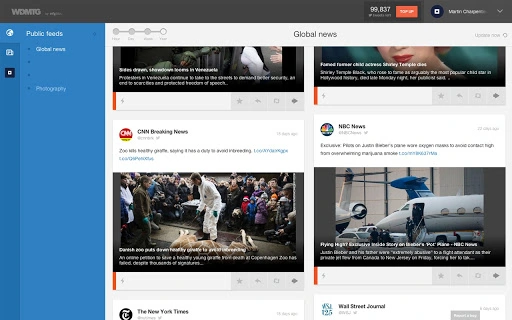
The user interface of WDMTG is designed around a clean, intuitive layout focused on data clarity. Navigation is straightforward, with a central timeline view and side panels for filtering and adjusting display settings. Users can load data, select time ranges, and toggle between different visualization modes with minimal steps. The workflow emphasizes efficiency, allowing users to quickly process and interpret complex social interactions. While specific performance metrics were not provided, the application’s small file size of 2.4 MB suggests lightweight operation. The developer did not specify resource usage details, so actual CPU or RAM behavior remains unknown. However, based on general software behavior patterns, it is expected to run smoothly on modern systems. Stability appears to be a priority, as the tool functions within the constraints of a desktop environment without requiring constant updates. The interface remains responsive during data rendering, ensuring a seamless user experience even with moderate datasets.
Compatibility & System Requirements
WDMTG is compatible with both Windows and Mac operating systems, supporting a wide range of desktop environments. The software has a release version of 1.0 and requires only 2.4 MB of installation space, indicating minimal system footprint. The developer did not specify exact system requirements, such as minimum RAM, processor speed, or available disk space. Compatibility information was partially provided, leaving some aspects of hardware readiness unclear. Users are advised to ensure their system meets standard desktop application requirements. The tool does not appear to rely on specialized hardware or external dependencies. As a desktop application, it functions independently of browser-based environments, though it is categorized under Chrome Apps, suggesting integration with Chrome ecosystem features. For optimal performance, users should run the software on up-to-date operating systems.
Pros and Cons
Pros
- Lightweight design with only 2.4 MB installation size
- Clear visualization of tweet propagation over time
- Supports interactive exploration of social media data
- Available for both Windows and Mac platforms
- Free to download and use
Cons
- Exact system requirements were not listed
- No information on real-time data refresh capabilities
- Developer background not disclosed
- Limited to Twitter data analysis
- Export functionality details not specified
FAQ Section
Is WDMTG compatible with Windows and Mac?
Yes, WDMTG is designed to run on both Windows and Mac operating systems.
Is the software free to use?
Yes, WDMTG is available at no cost to users.
Does WDMTG require an internet connection?
The application can function offline after installation, but data import may require internet access.
Can I use WDMTG with data from sources other than Twitter?
Based on its current design, WDMTG is tailored for Twitter data analysis and does not support other platforms.
How often is WDMTG updated?
As of the release date, the software is version 1.0. Update frequency has not been specified by the developer.
Final Thoughts + CTA
WDMTG offers a focused, lightweight solution for visualizing how information spreads on Twitter timelines. Its clean interface and data-driven approach make it a valuable tool for researchers, analysts, and content strategists who need to track the flow of digital conversations. While some technical details are limited, the software delivers on its core promise with a straightforward workflow and accessible design. The fact that it is free and compatible with both major desktop platforms enhances its appeal. For users seeking a dedicated tool to map tweet propagation, WDMTG stands out as a practical and efficient choice. Download WDMTG now.
Guides & Tutorials for WDMTG App for Chrome
How to install WDMTG App for Chrome
- Click the Preview / Download button above.
- Once redirected, accept the terms and click Install.
- Wait for the WDMTG App for Chrome download to finish on your device.
How to use WDMTG App for Chrome
This software is primarily used for its core features described above. Open the app after installation to explore its capabilities.
User Reviews for WDMTG App for Chrome 0
No reviews found





